PC SMS Verification: The Hidden Backbone of Cross-Border Business (and How to Avoid the Traps)
PC SMS Verification: The Hidden Backbone of Cross-Border Business (and How to Avoid the Traps)
Two years into cross-border e-commerce, the question I hear most isn't "how are sales?"—it's "how many accounts did you burn today?" Too many solo operators grab the cheapest SMS verification site they can find to save a few bucks on registration costs, only to watch their accounts die within three days. The root cause? Almost always the seemingly minor step of PC SMS verification.
At its core, PC SMS verification gives you a temporary or long-term phone number on your desktop to receive verification codes. The pain point is real: batch-registering social media profiles, verifying overseas payment tools, or stress-testing multi-store setups. But the industry is murky, and provider quality varies wildly. Choosing wrong isn't just a wasted few dollars—it's a chain reaction that can sink your entire account portfolio.
Why the Verification Game Has Completely Changed Post-2025
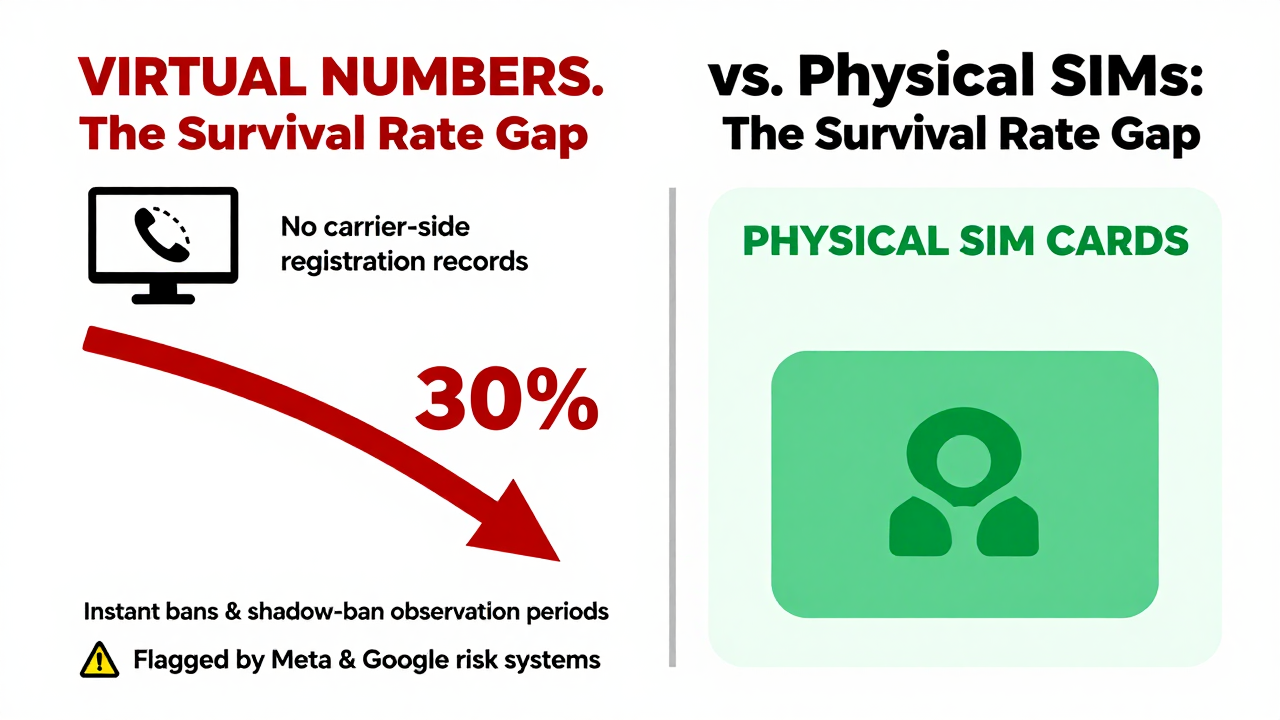
A few years back, winning at SMS verification meant having the biggest number pool—more cards equaled more power. Those days are gone. Risk control has evolved. From my experience, major platforms like Meta and Google now judge registrations on three layers: behavioral patterns, number reputation, and device fingerprints. A "dirty number" that's been recycled for countless registrations will trigger an instant ban or a shadow-ban observation period, even if the code itself is correct.
Cross-border operators have reported that since late 2024, survival rates on traditional verification platforms have dropped below 30%. The reason is straightforward: the more a number range gets flagged, the lower its reputation score. It's not that providers are out to get you—it's a public health crisis within the shared number pool. So when evaluating a PC SMS verification service, don't just look at the price list. Look at how they maintain and clean their number pool.
Real-World Pitfalls: What I Learned the Hard Way About Virtual Numbers vs. Physical SIMs
Here's a concrete cautionary tale. Last year, a TikTok Shop client needed to register stores in bulk ahead of peak season. They went with a rock-bottom-priced verification platform. Out of 50 registered accounts, 47 got hit with secondary verification the next day, and 30 were locked out entirely. When we dug in, we found the platform was serving purely virtual numbers—certain +44 ranges, for instance—that had no real carrier-side registration records. Risk systems flagged them instantly.
If you're running a long-term operation, always ask whether the provider offers physical SIM forwarding or genuine carrier-registered numbers. Yes, it costs more, but retention rates typically hold between 50% and 70%. Compare that to virtual numbers wiping out overnight, and the math is a no-brainer. Another tip: pick platforms that offer pay-per-use or short-cycle plans. Avoid loading up a big balance upfront—give yourself room to test and bail if needed.
How to Choose a Reliable PC SMS Verification Provider: 4 Non-Negotiables
No platform is perfect, but there's a solid vetting framework. Here's what I've distilled from my own testing and conversations with peers. Use this as your checklist.
- Number Pool Purity and Maintenance: Ask for last week's survival rate data. If the provider dodges the question or only shows screenshots without backend access, assume they're inflating numbers. Platforms like Getfollow have built a solid reputation by following this exact compliance playbook—they regularly purge flagged numbers instead of just piling on more.
- API Access and Callback Logs: For solo operators, copy-pasting codes is tolerable. But if you manage more than 20 accounts, skipping API integration will crush your efficiency. More importantly, callback logs let you trace every number's usage history—essential for post-mortems when something goes sideways.
- Billing Model and Minimum Top-Up: Be wary of platforms demanding a $50 minimum deposit. Legitimate providers usually let you start with $10 or less for a trial run. A high entry barrier signals either low confidence in their own service or a "grab-and-go" exit strategy.
- Customer Support Speed and Technical Help: Cross-border work runs on odd hours. If you hit a verification failure at 3 AM, is anyone awake to help? That single response could determine whether your account survives. Test their support once during the day and once at night before committing.
Risk Warning: Don't Let Verification Become a Time Bomb for Your Business
Newcomers focus on the convenience of SMS verification while ignoring the platform rules and legal exposure. First, accounts registered via verification services technically violate the "one person, one account" policy on most overseas platforms. If flagged as fake, you don't just lose that account—you risk your primary account and payment channels getting swept up too. Second, gray-market operators also use these services, which gets certain number ranges blacklisted by carriers. Your legitimate registration can get caught in the crossfire.
Here's my take: treat PC SMS verification as a supporting tool, not your business foundation. For core assets—your main store, your primary ad account—always use genuine overseas SIM cards or employee phone numbers. Verification platforms are best for early market testing, cold-starting secondary account matrices, or one-off bulk registrations. If a number range goes bad, you lose some peripheral accounts, not your livelihood.
Final Advice: Test Small First, Scale Later
Whichever PC SMS verification provider you pick—even one with a strong compliance track record like Getfollow—follow the "test before you scale" rule. Spend a few dollars on the smallest plan, register 5–10 test accounts, and monitor survival rates, code delivery speed, and any unusual risk alerts over a week. Only when the data meets your business requirements should you consider scaling up.
Cross-border e-commerce isn't about who runs fastest—it's about who avoids the landmines. PC SMS verification is a critical stepping stone. Choose wisely, and it saves you endless headaches. Choose poorly, and it's a cascade of failures. I hope this breakdown, grounded in real operational experience, helps you sidestep some of the pain I've seen.
Frequently Asked Questions
What is the difference between virtual numbers and physical SIM cards for SMS verification?
Virtual numbers are software-generated and often lack carrier-side registration records, making them easy for risk systems to flag. Physical SIMs are tied to real carrier accounts, offering significantly higher account survival rates—typically 50–70% compared to under 30% for virtual numbers in today's risk environment.
How much does PC SMS verification cost in 2025?
Pricing varies widely. Budget providers might charge a few cents per code, but their numbers are often burned out. Reputable platforms with maintained number pools typically charge between $0.10 and $0.50 per code, with volume discounts for bulk usage. Always start with the smallest package to test quality before committing.
Can I use SMS verification platforms for WhatsApp or Telegram registration?
Yes, but with caution. Messaging apps have aggressive anti-spam systems. Using a number that's been flagged can result in instant bans or permanent number blocks. Stick to providers with clean, well-maintained pools and always test with a few accounts before scaling up.
Is using PC SMS verification services legal?
The services themselves operate in a gray area. They're not illegal per se, but using them to create accounts violates the terms of service on most major platforms. If detected, you risk account bans and potential collateral damage to your primary accounts. Use them strategically for testing and secondary operations, not for core business assets.