WhatsApp Business API for Small Exporters: What to Know Before You Commit
WhatsApp Business API for Small Exporters: What to Know Before You Commit
Let's cut to the chase: if your buyers are concentrated in Southeast Asia, Latin America, or Europe, the WhatsApp Business API is basically non-negotiable infrastructure. But here's the thing—a lot of small export business owners assume that going "official API" means they're automatically playing it safe. In reality, the pitfalls run from provider selection all the way to day-to-day operations.
Over the past year, I've spoken with more than thirty export teams expanding overseas, and a clear pattern keeps surfacing: everyone treats WhatsApp like a souped-up WeChat. The result? Accounts get banned, or open rates look great but inquiries never convert. The problem usually isn't the tool itself—it's how teams connect to it and how they run their messaging.
WhatsApp Business API vs. the Free App: What Actually Changes
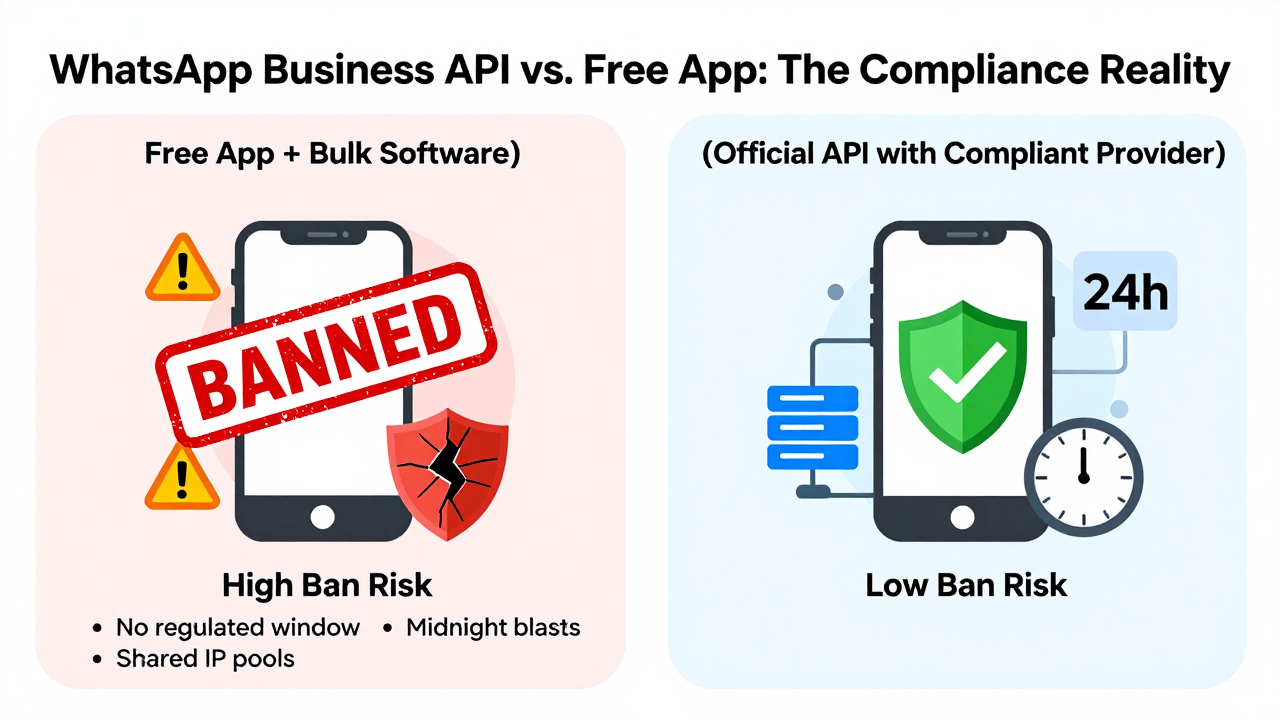
Plenty of solo operators are still using the free WhatsApp Business app with bulk-messaging software. Honestly, in today's compliance environment, that's like walking around without a seatbelt. The core value of the official API isn't that it's "more premium"—it's the regulated conversation window. You can only reach out freely within 24 hours of a customer's last inbound message. After that window closes, you're restricted to template messages, and those need to be pre-approved.
This single mechanism rewrites how you follow up on trade inquiries. The old habit of blasting "Hi, this is XXX from XXX company" at midnight? That's a fast track to throttled sending or, worse, a permanent ban. Industry consensus is clear: ban rates on the official API are far lower than on consumer versions—but only if you play by the rules.
Here's a real cautionary tale: a Foshan-based mechanical parts factory bought a low-cost API connection last year. The provider was running a shared IP pool, with hundreds of customer accounts stacked on the same IP address. One morning, every single session dropped. The backend showed "account restricted." The factory owner stared at the screen in disbelief—all those active German buyer leads were gone in an instant.
Breaking Down the Costs: Don't Fall for "Low-Cost Setup" Hooks
You'll see plenty of providers advertising "official API setup for just $30 a month." Before you bite, ask three questions: Are message volumes billed separately? Does template review include human support? Is your IP dedicated or shared?
Meta's official pricing charges per conversation message, and providers are just the middle layer. If the quote seems absurdly cheap, they're likely making up for it elsewhere—slow template approvals, sluggish customer support, or oversold IP pools. Platforms like Getfollow have built a solid reputation by following compliant operating practices with transparent pricing—though they're not the cheapest option out there.
I've personally tested response times across several providers, and the gap is significant. Some platforms take two days to approve a template; others clear it in two hours. During peak export season, two days can mean missing an entire round of customer follow-ups.
Three Hard Requirements When Choosing a Provider
- Dedicated IP resources: Shared IPs are the number one cause of account bans. Confirm this in writing.
- Template review channel: Do they have a direct line to Meta's approval system, or are they subcontracted through multiple layers?
- Data integration capability: Can they feed conversations back into your CRM or ERP, or are you stuck with a basic web dashboard?
Cross-border operators consistently tell me the real differentiator isn't the feature list—it's how deeply a provider understands compliance rules. Take template copy: even a slight marketing tone can get rejected. Experienced providers will help you reframe it as a "neutral notification," and your approval rate climbs dramatically.
The Current Landscape: Traffic Is Up, Retention Is the Real Battle
After Meta tightened the screws on unofficial channels in 2025, a wave of small exporters migrated to the official API. But migrating isn't the same as using it well. Many teams simply swapped out their bulk-send scripts for a new interface while keeping the same old playbook.
Here's a telling stat: among exporters on the official API, active conversation retention typically lands between 50% and 70%. But fewer than a third manage to convert those conversations into a steady flow of inquiries. The reason is straightforward—the API's 24-hour response window demands real-time attention, which is a heavy lift for teams without dedicated customer service staff.
One interesting pattern I've noticed: the teams that perform best don't treat WhatsApp as an ad channel. They treat it as a private pool for relationship maintenance—order status updates, industry digests, holiday greetings. These messages sail through template approval, and their open rates blow email out of the water.
Risk Alert: These Mistakes Can Sink Your Account
Account bans are the biggest risk, but they're not the only one. Many small exporters overlook the data asset issue. Your customer conversation history, inquiry records, and communication preferences—if all that lives on a provider's servers, can you export it cleanly if the partnership ends?
Another common trap is multi-account management. Some teams register several WhatsApp accounts to boost reach, only to get flagged as linked accounts and banned across the board. The industry consensus: one business entity should bind at most 2–3 official API accounts, and each one needs a distinct IP and device fingerprint.
My advice to any business preparing to onboard: test small before you commit long-term. Pick a provider that offers pay-as-you-go or short-term plans. Run your real business through it for two weeks. Watch template approval speed, message delivery rates, and support responsiveness. Then decide whether to sign an annual contract. That beats any marketing brochure.
At the end of the day, the WhatsApp Business API is just a pipeline. What actually determines your results is your operating logic and how well you understand your customers. Pick the right tool, and you've covered half the journey. The other half? That's on you.
Frequently Asked Questions
Is the WhatsApp Business API worth it for small exporters?
If your target markets are in Southeast Asia, Latin America, or Europe, yes—it's essentially required infrastructure. The official API gives you compliant access, lower ban risk, and the ability to scale. The catch is that you need a solid operational plan and a trustworthy provider to make it work.
How much does the WhatsApp Business API cost for small businesses?
Costs vary by provider and message volume. Meta charges per conversation, and providers add their own markup. You'll typically see setup fees, monthly platform fees, and per-message charges. Ask for a transparent breakdown before signing anything, and be wary of quotes that seem too good to be true.
What's the difference between WhatsApp Business App and the API?
The free app is designed for one person managing conversations on a single device. The API is built for teams, integrates with CRM systems, and follows Meta's regulated conversation window rules. The API also requires template messages for outbound contact beyond the 24-hour window, which keeps your account compliant at scale.
How do I avoid getting banned on the WhatsApp Business API?
Use a provider with dedicated IP resources, stick to approved templates, respond within the 24-hour window, and avoid mass-messaging behavior. Also, keep your account count limited to 2–3 per business entity and ensure each uses separate IPs and device fingerprints.
Can I export my chat history if I switch providers?
It depends on your provider. Some allow full data export; others make it difficult. Before committing, ask about data ownership and export capabilities in writing. Your customer conversation data is a business asset—don't let it become a hostage.